
The problem
This article was written to discuss how we addressed and resolved the challenge of quickly automating the process of filling out large numbers of forms. Specifically, we needed to complete a process on a public portal that required filling out multiple text fields with various pieces of information. Below are some summary images showing the structure of the forms to be filled out:
1. Search form for a specific case

2. Once the practice has been identified, the following form must be completed
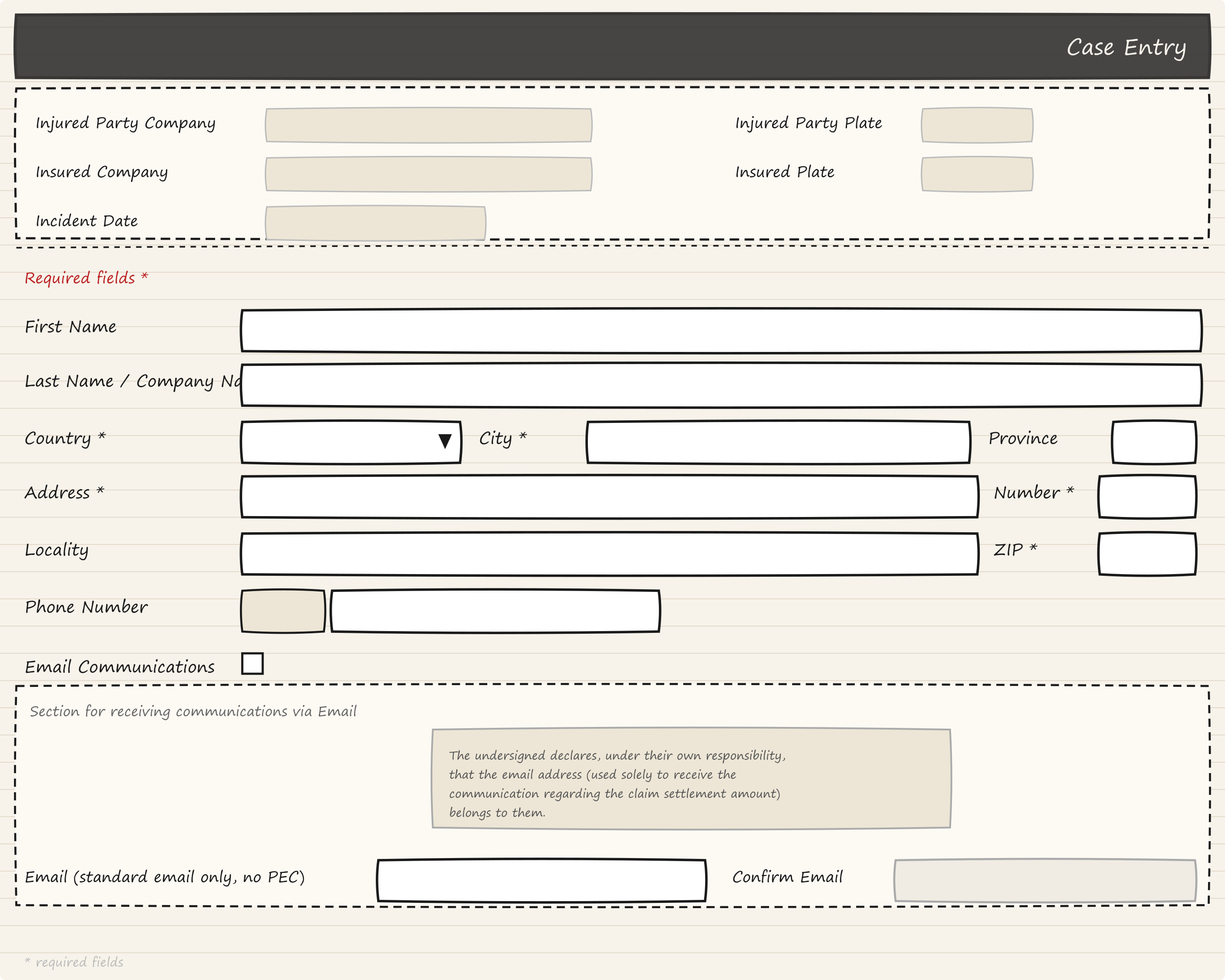
Once this form is filled out, the request is submitted, and a PDF file summarizing the completed transaction is downloaded. The company requested that this process be automated because each operator took roughly 8 minutes to fill out the form. Considering that during certain periods there could be over 150 requests, performing these tasks manually was very tedious.
Let’s do the math: 8 * 150 = 1,200; converted to hours: 1,200/60 = 20 hours!
20 hours spent on these tedious and repetitive tasks!
The adopted solution
We therefore considered various solutions to address the problem, and ultimately decided to use Playwright to automate the filling out of the various forms, submit the request, and download the final summary PDF. We then used AWS Step Functions to easily orchestrate the various operations and manage the individual processing stages.
Let’s first discuss why we chose AWS Step Functions.
Step Functions were a natural choice since we needed to be able to easily orchestrate a series of tasks and quickly define retry logic.
Below is a diagram of the Step Function we developed:
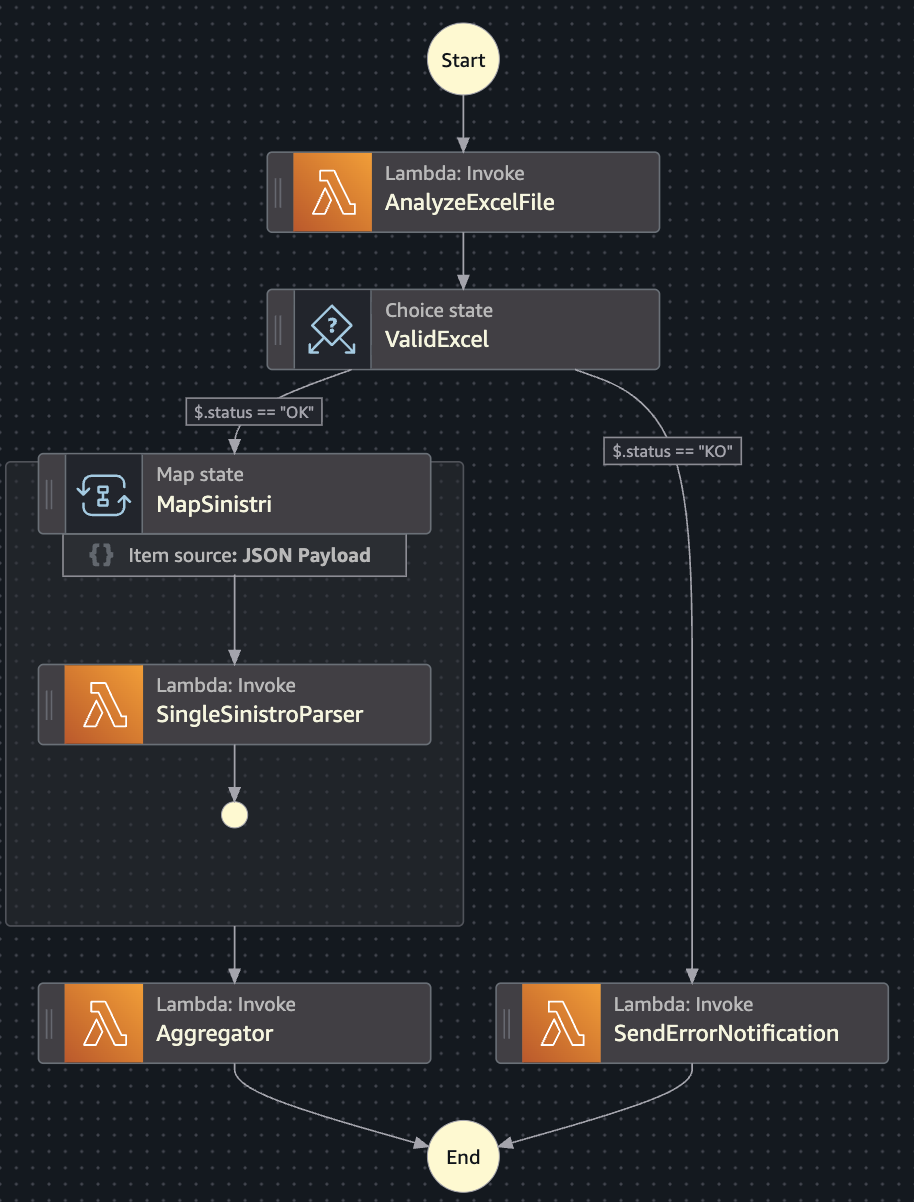
The diagram summarizes the workflow of the following steps:
- input and validation of the Excel file
- parallel processing of individual cases via browser automation
- Excel and PDF output as an archive.
Let's analyze each of them
1. Input and validation of the Excel file
This task involves analyzing the Excel file provided by the operators, where each row represents a single request to be processed. This Excel file contains the information needed to fill out the first form in order to identify the specific request to be processed; the Excel file may contain more than one request — even over 100! If the input Excel file conforms to the specified template and the entered data is correct, we can proceed to process each individual request listed in the Excel file and begin filling out the two forms. If not, a summary file will be generated indicating the issues found in the input Excel file, and the workflow will terminate.
2. Parallel processing of individual cases via browser automation
This task involves filling out forms, which can be considered the “heart” of the automation. Since each request is independent of the others, it makes sense to process them in parallel; therefore, a Map State is used to handle each individual row of the Excel file (the previously validated dataset) in parallel. Concurrency has been set to 6 to prevent potential blocks by the portal. The automation is performed using Playwright, which runs in headless mode that is, without a UI, and interacts with the forms by filling in all necessary data, via code, into the text fields and checkboxes of interest.
It should be noted that to use Playwright in a Lambda Function, it was necessary to write a custom Dockerfile, as the one provided by Microsoft—in addition to containing many more files (resulting in heavier containers and longer cold starts)—does not provide native integration with Lambda. Writing a custom Dockerfile allowed us to optimize the image by removing unnecessary components such as WebKit and Firefox using multi-stage builds, saving space on the final image, and then adding awslambdaric, making the image compatible with Lambda. All of this resulted in a 23% reduction in the size of the Docker image.
3. Excel and PDF output as an archive
In this task, the results obtained will be aggregated. By processing each individual request, the results will be aggregated into a single Excel file, where each row represents the result obtained from processing that specific request. Along with this Excel file, all PDF files generated from each request processing step performed in the previous task will also be downloaded, and everything will be compressed into a single archive that will be provided to the front-end as the output of the request made by the operator.
Why Playwright?
But now let’s ask ourselves another question: why use Playwright instead of any other web automation tool?
There are many reasons:

